Several bots, one chat.
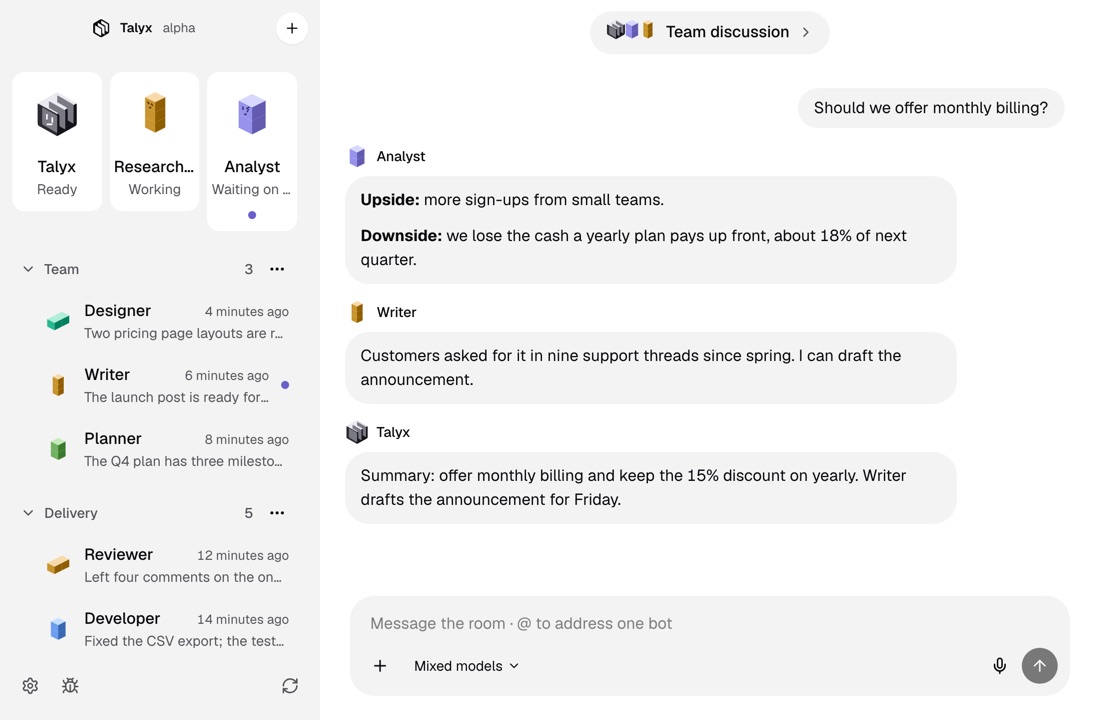
A group room puts two to six bots in one chat. You write once, each bot answers in turn, and Talyx shows who is answering now and who is next.

How it works
Make a room.
Click + in the roster, choose New room, name it and pick two to six bots.
Write to the room.
Every bot in the room answers in turn. Start with @ and a bot’s handle to ask just that one.
Approve what they ask for.
When a bot in the room wants to run something, its approval card shows in the room. Allow it once or deny it there.
How rooms work
The engine hosts it
Rooms run in the engine, not in the app. The engine keeps each room’s history, so the conversation is there the next time you open it.
One model, or each their own
Switch every bot in the room to one model, or leave each bot on its own.
Pin it, file it, delete it
Rooms sit in the roster beside your bots. Deleting a room keeps its bots and their own chats.
More of Talyx
DownloadTalyx.
Free and open source under MIT. No account and no card.
- A computer
- A Mac with macOS 13 or newer, or Linux x64.
- The engine
- First-run setup installs it, for your user only.
- A model
- An API key or a sign-in with your provider account.
Version 1.0.0. Not sure which Mac you have? Apple menu, About This Mac: it shows Chip for Apple Silicon or Processor for Intel. Windows comes later.
Builds are not signed. On a Mac, open Talyx once, then click Open Anyway in System Settings, Privacy & Security, or run xattr -dr com.apple.quarantine /Applications/Talyx.app. On Linux, run chmod +x Talyx-x86_64.AppImage, or install the deb with sudo apt install ./Talyx-amd64.deb.