Jobs on a schedule.
A routine is an instruction a bot carries out on a schedule, such as a cash report every Monday morning. The engine runs it, even with Talyx closed.

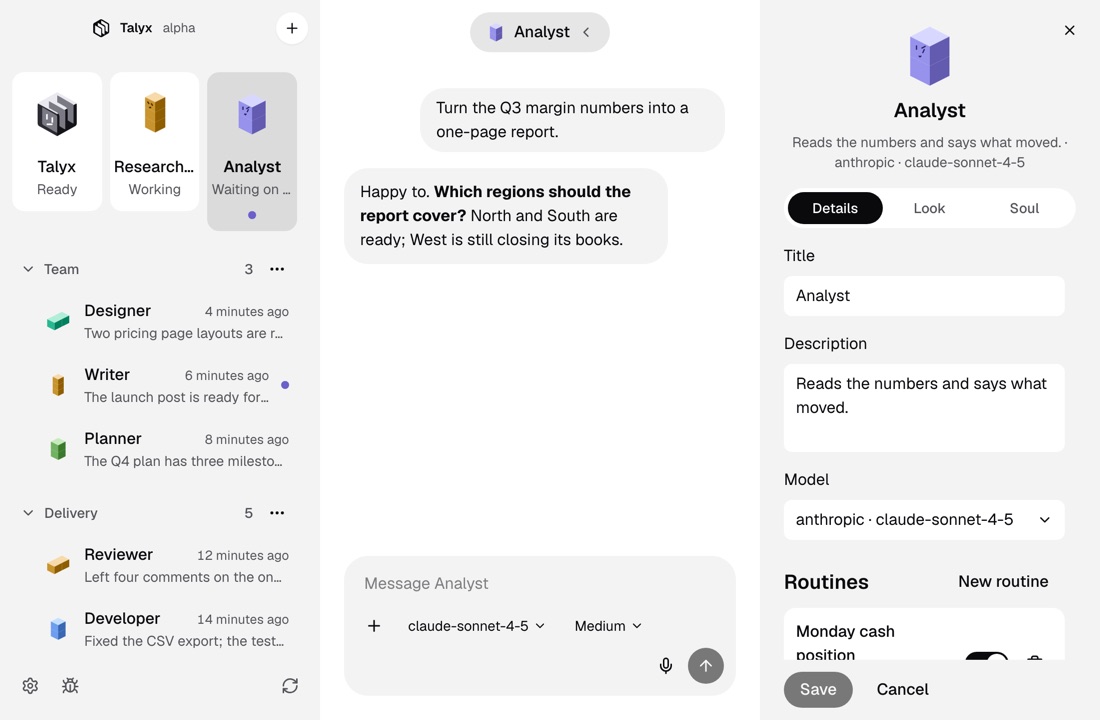
How it works
Open the bot’s details.
Click the bot’s name at the top of its chat. Routines sit below its title, description and model.
Say what to do.
Click New routine, give it a name and write the instruction: what the bot should do each time.
Pick when it runs.
Daily, on weekdays or once a week at a time you choose, or every few hours. For any other schedule, write a cron line.
After you set it
Results in the chat
Turn on Post to this chat and each run lands in the bot’s chat, next to your own messages.
Pause, run or delete
A switch turns a routine off and on again. Run it now to try it, or delete it to remove it from the engine.
More of Talyx
DownloadTalyx.
Free and open source under MIT. No account and no card.
- A computer
- A Mac with macOS 13 or newer, or Linux x64.
- The engine
- First-run setup installs it, for your user only.
- A model
- An API key or a sign-in with your provider account.
Version 1.0.0. Not sure which Mac you have? Apple menu, About This Mac: it shows Chip for Apple Silicon or Processor for Intel. Windows comes later.
Builds are not signed. On a Mac, open Talyx once, then click Open Anyway in System Settings, Privacy & Security, or run xattr -dr com.apple.quarantine /Applications/Talyx.app. On Linux, run chmod +x Talyx-x86_64.AppImage, or install the deb with sudo apt install ./Talyx-amd64.deb.